Online services
The City of Menlo Park only accepts on-line digital Building permit applications, revisions, deferred submittals and building inspection requests.
All applications, plans and supporting documents are to be submitted digitally through the City’s Accela permit management system using the Accela Citizen Access Portal (ACA).
Documents submitted via the online permit portal must follow the file specifications outlined below in order for the permit applications, revisions to issued permits, etc. to be processed.
Below is information about how to register an ACA account, submit new Building permit applications, revisions to issued permits, deferred submittals, how to schedule building inspections online and more.
Registration
The Accela Citizen Access Portal (ACA) provides reference information on existing records to anonymous users, but expanded features require registration. The City's site is distinct from similar "ACA" sites that other jurisdictions offer, so users who might be doing work in other cities/counties will need to sign up independently.
To register, click on either of the "Register for an Account" links on the home page and follow the prompts:
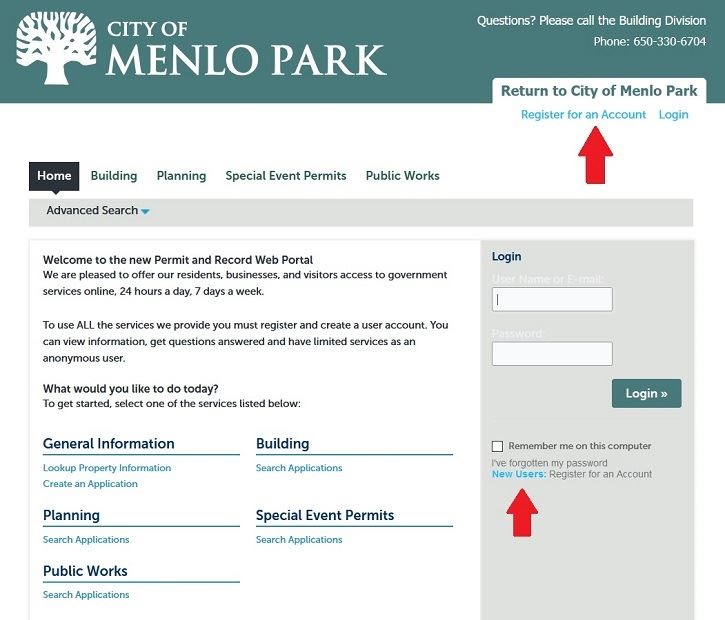
Your account will be automatically linked to any new records that you apply for through the portal. If you need to be added to record that has already been created (e.g., if your permit was created before online applications were accepted, or you have joined a project team after the permit was originally submitted), please create an account per the direction above, and then email the Accela Citizen Access Portal (ACA) with the record number, the email address you used to sign up for your account, and any information that documents your association with that permit.